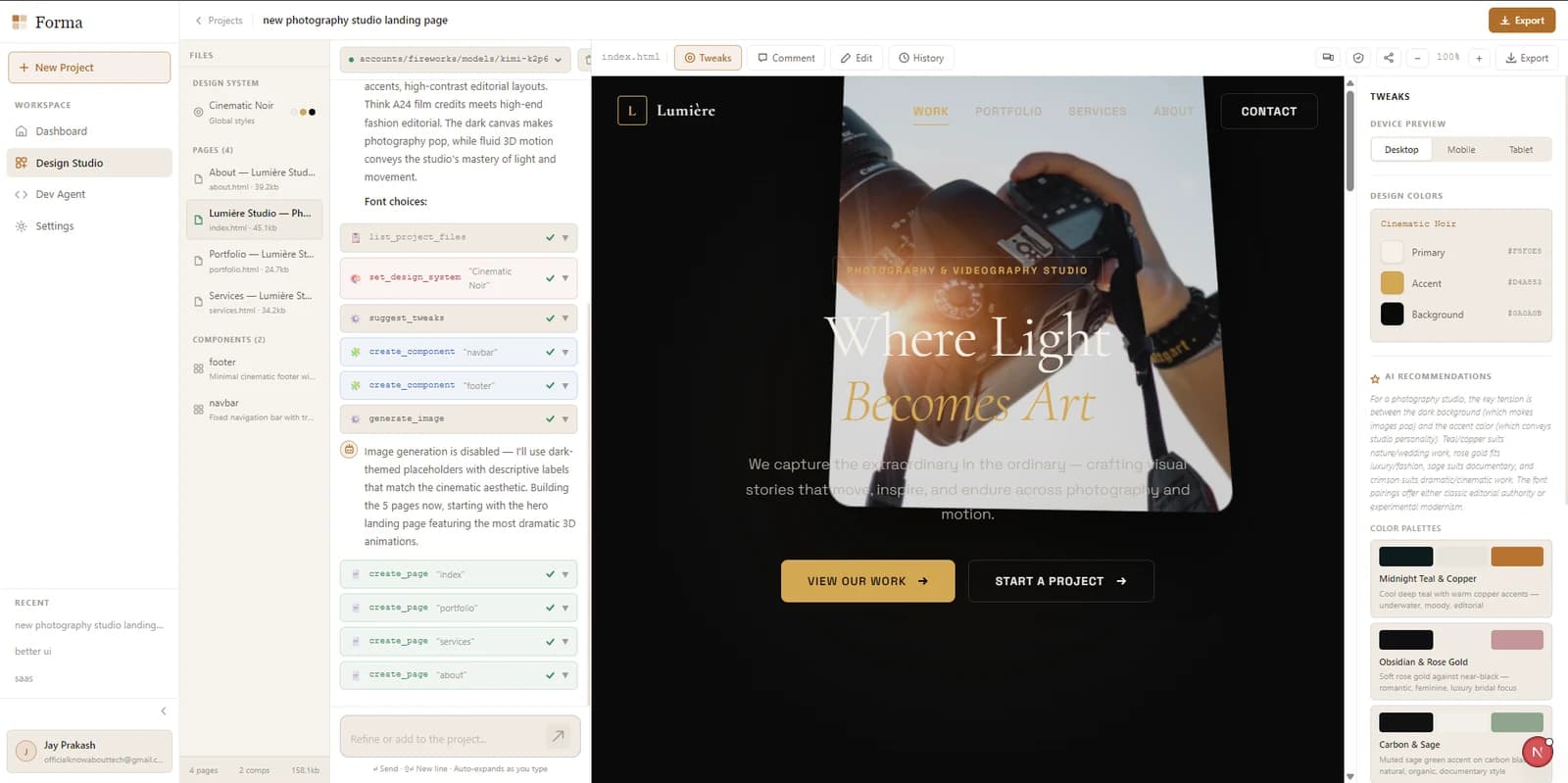
An AI design and development studio that connects visual prototypes with a separate development workflow, sandbox previews and persistent project files.
Full-stack development, agent workflows and sandbox integration
Project status
In development
Context
Personal project
01 / The problem
What needed to work.
A generated interface still needs coherent components, installed dependencies and a place to run. Forma makes those stages visible so a maker can inspect a design before moving it into a development workflow.
02 / My contribution
Across the interface and the system.
I built the studio interface and its agent workflows, connected the development sandbox, and implemented project-file persistence. The design and development stages have separate responsibilities and an explicit point for review.
Made for Developers and makers exploring AI-assisted application building.
03 / A closer look
The product, in context.
In the workshop’s local study, switch between three authored assemblies to see a composition change. It does not generate code or contact an AI service.
Product captureDevelopment capture of the design studio and its generated preview.
04 / The decisions
The thinking underneath.
01
Give design and development separate jobs
The design workflow manages pages, components and shared visual settings. A separate development workflow takes the selected design into files, commands and a runnable environment. This creates a clear point for review between the two stages.
02
Separate the runtime from the project record
Daytona supplies the execution environment, while PostgreSQL holds project files and conversation records. File synchronization and restore paths support later sessions without treating a temporary sandbox as the only copy of the project.
03
Use concrete feedback for the next step
An import guard checks generated imports against package.json and returns missing-dependency feedback to the agent. Command results and an optional retrieval layer for past error resolutions provide additional context for corrections.
05 / The result
What the software makes possible.
The studio presents pages, reusable components, design controls and agent tool activity alongside the preview.
A design can become the input to a development workspace with file tools, terminal output and sandbox previews.
Project-file persistence and optional error retrieval support continued work across sessions.
06 / The boundaries
Built within real constraints.
This is a personal project in development; a public release and adoption results are not claimed.
Generated code still requires review, and model and sandbox services require configuration.
The import guard and stored error resolutions support correction; they do not guarantee error-free output.
The tools
A stack chosen for the work.
Next.js
React
TypeScript
Hono
TanStack Query
OpenRouter
Daytona
Drizzle
PostgreSQL
Upstash Vector
Next on the workbench
What are you imagining?
Tell me what you want to make, who it is for, and where you are getting stuck.